We submitted a new version of Gluroo (1.9.185) to the App and Play stores and it will be rolling out soon. This release includes many polish improvements and bugfixes and a good handful of new functionality including:
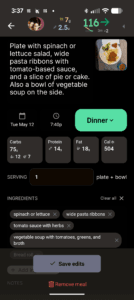
- Gluroo now uses a new Meal Details screen and a whole new editing experience. This also includes a new nutrition summary look. These were co-developed with our newly-announced FlashSnack product.
- Selecting a message on the Log screen now works with just a simple tap (no long-press needed) and opens up the context menu as a bottom sheet, rather than stacking the context menu above the entry controls at the bottom of the screen. “View Image” and “View Edits” are new context menu options.
- Set Time from the context menu and the Time Selector from the action tray (when using the Plus menu to log items) now uses more standard widgets and provides a bit more flexibility in setting the date and time separately. You can still swipe messages left and right to move them back and forward in time, too.
- You can now edit and remove meals from the “Meals” tab instead of having to find the meal/log-entry on the “Log” tab.
- The Meals Tab now uses the actual meal names as labels instead of the old clustering algorithms. This means more meals will be characterized as “Snacks” if you’re not using #mealname or entering meals from the Meals screen, but at least the behavior is now predictable. The charts on the Meals screen under “Details” now includes insulin and meal information shown on the chart.
- The Meals Tab also now allows left/right swiping to change days
- Charts now show new sensors that have been logged and label OP5 Automatic Mode as “A”, Manual Mode as “M” and Limited Mode as “L”.
- Chart forecasts now render as pseudo-error bars instead of just purple circles. These are meant to illustrate that they are low-confidence ranges, and they aren’t mathematically-accurate error bars yet.
- Dexcom G7 15d sensor QR codes are now supported and Gluroo knows they have 1h warmup and 15 day wear.
- The “Other” Food setting is now labeled “Carbs vs. Net Carbs” and properly summarizes itself to help make it easier to understand.
- Improved the handling of sugar vs. non-sugar carbs to ensure continuous behavior of carbs-on-board estimates (instead of relying on a glycemic index estimation that had discrete cutoffs)
- We improved the programmatic translations to other languages to preserve capitalization (in languages that use similar capitalization to English) and tried to make more of those translations fit into the UI so you should see less cut-off or wrapped text in non-English.
- We fixed a focusing bug on some Samsung Phones at the initial zoom when the camera is first opened.
- We started some work on reducing energy and network use, especially on Android.
Give us your feedback by joining the Facebook Gluroo Diabetes Logger Community
And please follow us our facebook page: Gluroo Diabetes Logger
Finally: please spread the word about our GotCGM and brand new FlashSnack subscription products — FlashSnack is free until mid-June and is the fastest and easiest way to log nutrition information for all people, whether they have diabetes or not!