We submitted a new version of Gluroo (1.9.109) to the App and Play stores and it will be rolling out soon. This release includes several bugfixes and a good handful of new functionality including:
- Much improved but still EXPERIMENTAL support for users who do NOT use a CGM including configurable reminders to check blood sugar with a blood glucose meter; options include after waking, before sleeping, at meal times, and some number of hours after a meal is logged, with an option for reminding rechecks when still out of range
- EXPERIMENTAL Tandem tslim:x2 and mobi integration is available in Menu > Settings > Insulin. Gluroo is not affiliated with Tandem and this integration could go away at any time.
- twiist pump integration is available during onboarding (and later via Menu > Settings > CGM)
- Improvements to the AI vision analysis
- A variety of backend performance improvements THAT MAY BREAK some behavior of the mobile and/or web app. The new features we’re shipping tax our backend more so we’re investing more in these kinds of optimizations.
- Fixed a not-harmful but made-the-app-feel-slow bug where the new log items were not always showing up in the Gluroo Event Log immediately – they only showed up after fully-committed to disk (which takes longer).
- Some layout improvements to the Gluroo Entry Log to help make the day headers stand out a bit more as you’re scrolling through.
- Meal Reminders can be configured to be 30m before, at start, in middle of meal time range, 30 minutes before end, at end, or 30 minutes after end of meal time range.
- Brought back the numeric keypad extension on iOS
- more support/* help documentation is linked to, especially for insulin pump integrations.
- improved text-only analysis of meals
- Removed Dexcom sensor reporting helper, just link to their FAQ about reporting sensor failures (this Gluroo feature had not been working since they updated to require a signed-in user to report a failed sensor)
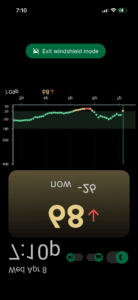
- Heads Up Mode has a new mirrored display to see it correctly in the reflection in the windshield when driving with the phone facing up at the windshield on your dashboard. Use at your own risk and with great caution.
- Improved insights report – it’s shareable and, as of the prior release, can be emailed to you as a PDF document.
- The @Gluroo coach has a lot of new capabilities and far better reasoning skills. Roo is now capable of showing BG charts and rendering text with some style, as well. Stay tuned for an upcoming update that surfaces these capabilities in new ways!
Give us your feedback by joining the Facebook Gluroo Diabetes Logger Community
And please follow us our facebook page: Gluroo Diabetes Logger