(New August 2026)
If you’re running Android 16 or 17 on a Google Pixel phone or another Android variant that supports “Live Update Notifications”, Gluroo can show your most recent CGM value and trend arrow on the lock screen always expanded and — depending on competition from other apps’ notifications — as a chip at the very top of your screen in the notification shade.
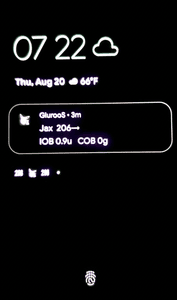
The Always-on-Display on a Pixel 10 showing the notification (photo from another phone — screenshots from the AOD are tricky to do.)
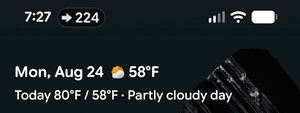
The notification shade showing the Gluroo live update chip with trend arrow as the icon (on the left) and a BG of 224. It will show as mmol/L (e.g., 12.5) if you have those units set as your preference. The chip showing like this is at the discretion of the phone’s Android operating system. Gluroo asks for the notification to be promoted to this display, but depending on a variety of circumstances it may not always happen and is not a bug in Gluroo when it does not show.
This feature is experimental and DOES NOT WORK ON ALL ANDROID PHONES AND EXPLICITLY DOES NOT WORK ON SAMSUNG DEVICES AS OF NOW — it is off by default on a Samsung Android phone.
You can enable or disable the feature using: Menu > Settings “Show CGM On…” section > CGM Live Update.